Context
HouseBox is an e-commerce case focused on automating customer support operations. The project covers incoming inquiries about orders, deliveries, payments, returns, and product information.
Problem
Incoming customer emails needed to be reviewed, categorized, prioritized, and assigned to the appropriate team members.
Handling these steps manually could delay responses to urgent requests, while tracking SLA deadlines separately made it harder to identify and escalate overdue tickets.
The goal was to automate ticket routing and establish a consistent SLA monitoring and escalation process.
Solution
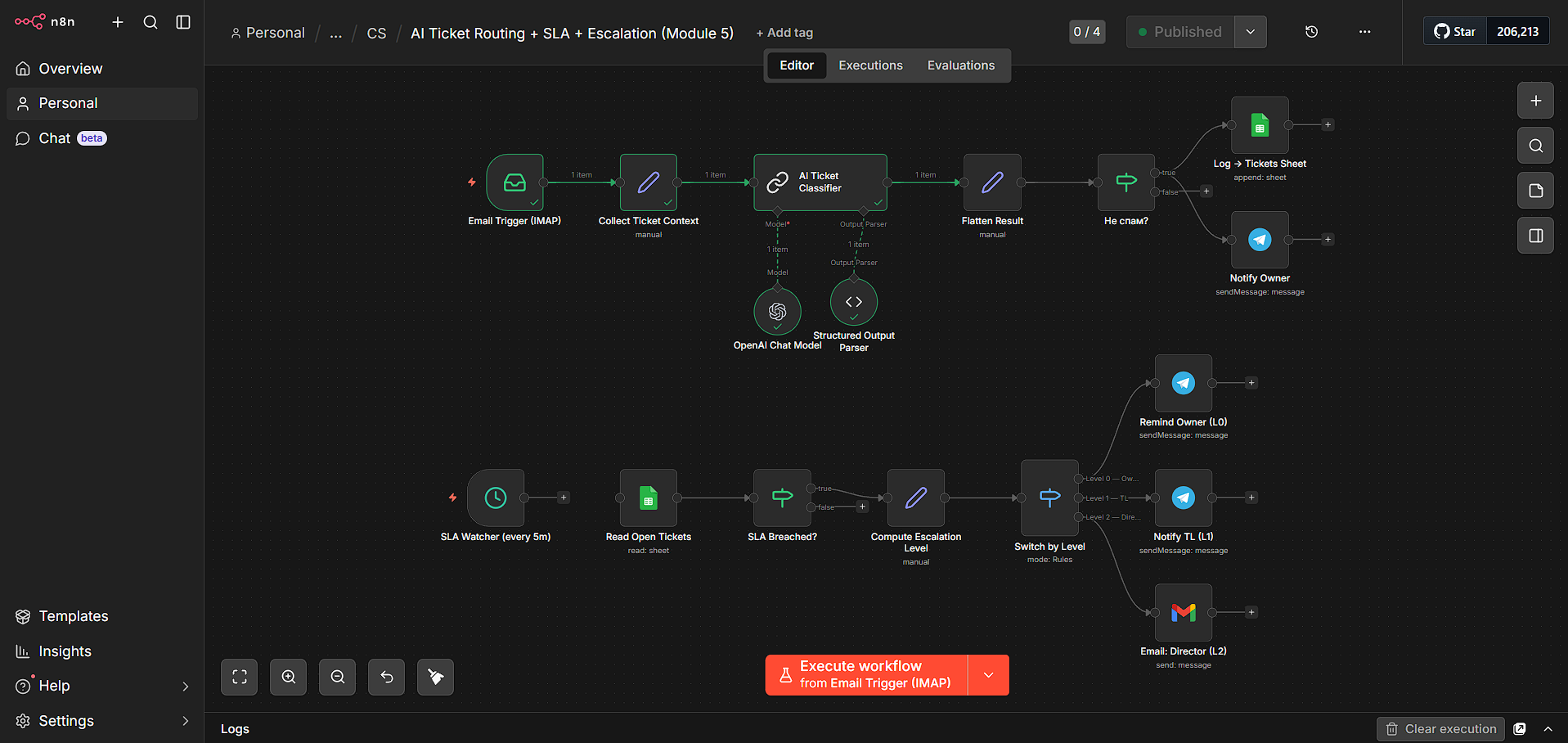
Built an AI-powered ticket management workflow in n8n that automatically processes incoming customer emails.
OpenAI classifies each request, assigns a priority from P1 to P4, selects the responsible team member, and generates a ticket summary with classification reasoning. Valid tickets are logged in Google Sheets, while spam is filtered out.
A separate SLA monitoring workflow checks open tickets and automatically triggers one of three escalation levels through Telegram or email when a deadline is breached.
Process
- Ingest customer email: An IMAP trigger receives incoming messages. n8n collects the message ID, sender, subject, body and creation time into the ticket context.
- Classify and filter: OpenAI returns structured classification data: category, P1–P4 priority, responsible owner, summary and reasoning. A separate check filters out spam before ticket logging.
- Route and log: Valid requests are assigned to the responsible team member according to the classification. Ticket details and SLA deadlines are recorded in Google Sheets, and the owner is notified through Telegram.
- Monitor SLA deadlines: A separate scheduled workflow runs every five minutes, reads open tickets from Google Sheets and checks for breached SLA deadlines.
- Escalate overdue tickets: The workflow computes an escalation level and routes notifications: L0 reminds the owner through Telegram, L1 notifies the team lead through Telegram, and L2 emails the director through Gmail.
- Verify scenarios: Testing logged 10 tickets and exercised all three escalation levels. These results demonstrate ticket processing and escalation behavior, without establishing automatic ticket resolution or persistence of escalation states.
Tech Stack
- Automation: n8n
- AI: OpenAI
- Email ingestion: IMAP
- Ticket log: Google Sheets
- Notifications: Telegram Bot API
- Director escalation: Gmail
Results
- Automated Ticket Processing: Incoming emails are classified and routed without manual sorting.
- AI-Powered Prioritization: Tickets receive a category, priority, assigned owner, summary, and classification reasoning.
- Centralized Ticket Log: Ticket details and SLA deadlines are stored in Google Sheets.
- Spam Filtering: Promotional emails are separated from customer support requests.
- SLA Escalation: Overdue tickets trigger notifications at three escalation levels.
- Verified Workflow: Successfully logged 10 tickets and tested all three escalation levels.
Visuals